

Stop Microsoft Office 2010 Activation Wizard Popup
- # Office 2010
- # Activation Wizard
Here is a Temporary fix for Microsoft Office 2010 Activation Wizard Popup
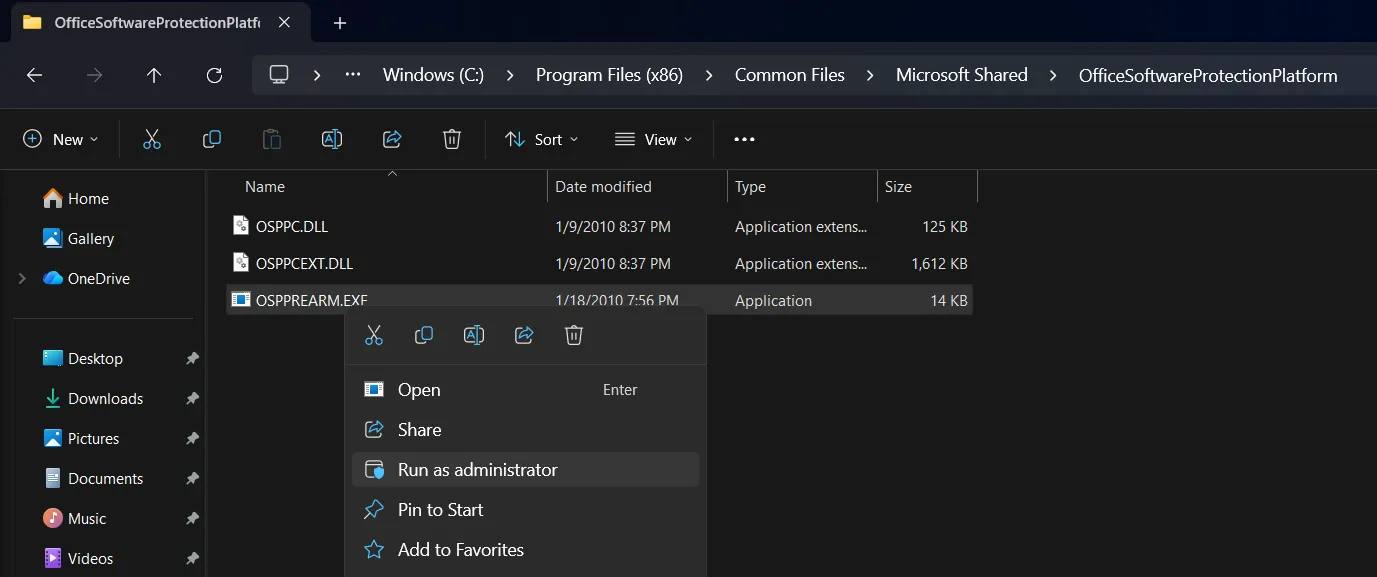
Run this OSPPREARM.EXE file as Administrator. You can find it in Windows installed disk at Program Files (x86)\Common Files\Microsoft Shared\OfficeSoftwareProtectionPlatform
What is OSPPREARM.EXE?
OSPPREARM.EXE is a Microsoft Office licensing utility associated with the Office Software Protection Platform. The name comes from Office Software Protection Platform Re-Arm.
It is commonly mentioned in discussions about Office activation because the utility can rearm an Office installation under supported licensing and deployment scenarios.
Microsoft documents the rearm process primarily for volume-licensed Office installations and operating-system image deployment.
What does “rearm” mean?
Rearming does not mean activating Office.
A rearm resets certain licensing-related state so that an Office installation can enter its grace period again. In Microsoft’s documented volume-licensing deployment scenario, rearming resets the grace timer and resets the client machine ID (CMID).
The purpose is to prepare an Office installation before an image is captured and deployed to other computers. It is not intended to provide a permanent license.
Why do people talk about OSPPREARM.EXE?
Older Office installations sometimes show activation notifications when Office has not been activated.
Because OSPPREARM.EXE is related to the Office licensing system, some online tutorials describe running the executable as a way to make activation reminders disappear temporarily.
This can create confusion between rearming and activation.
They are not the same thing:
| Term | Meaning |
|---|---|
| Activation | Verifies that Office has a valid license and activates the installation |
| Rearm | Resets certain licensing/grace-period state |
| Product key | The 25-character key used to install or activate a licensed copy |
| OSPPREARM.EXE | Microsoft’s Office rearm utility |
Is OSPPREARM.EXE a crack or activator?
No. The executable itself is a Microsoft Office component.
However, using rearm repeatedly with the intention of avoiding the requirement to activate an unlicensed copy is not the same as legitimately activating Office.
A valid Office license is still required.
Office 2010 and activation
Microsoft states that Office 2010 requires activation. If it is not activated, it eventually enters Reduced Functionality mode, where users can open documents for viewing but cannot edit them normally.
For a legitimate Office 2010 installation, Microsoft recommends using the built-in Activation Wizard and activating with a valid product key.
Office 2010 reached end of support in October 2020, so it no longer receives security updates or technical support.
Where is OSPPREARM.EXE located?
On Office 2010 installations, Microsoft documentation places ospprearm.exe in the Office Software Protection Platform directory under the Microsoft Shared/Common Files installation path.
The exact location can vary depending on whether Office is 32-bit or 64-bit and how it was installed.
For this reason, it is better to treat the file as an Office system component rather than downloading an OSPPREARM.EXE file from an unknown website.
Important safety note
Do not download OSPPREARM.EXE from random “Office activator” websites.
If you find an executable with this name outside your legitimate Office installation, verify its source before running it. Malware can be distributed using familiar Microsoft filenames.
Bottom line
OSPPREARM.EXE is a legitimate Microsoft Office licensing utility used for rearming Office installations in specific scenarios.
It is not a permanent Office activator and should not be confused with a product key or a genuine activation process.
If an Office 2010 installation repeatedly shows the Activation Wizard, the correct solution for a licensed copy is to troubleshoot or complete activation rather than relying on repeated rearming.
Official references
- Microsoft Support: Activate Office 2010
- Microsoft Learn: Rearm a volume-licensed Office installation
- Microsoft: Office 2010 End of Support